> ## Documentation Index
> Fetch the complete documentation index at: https://docs.meetsquad.ai/llms.txt
> Use this file to discover all available pages before exploring further.
# Strategy
> Visualize and manage your product strategy with Opportunity-Solution Trees
 ## Overview
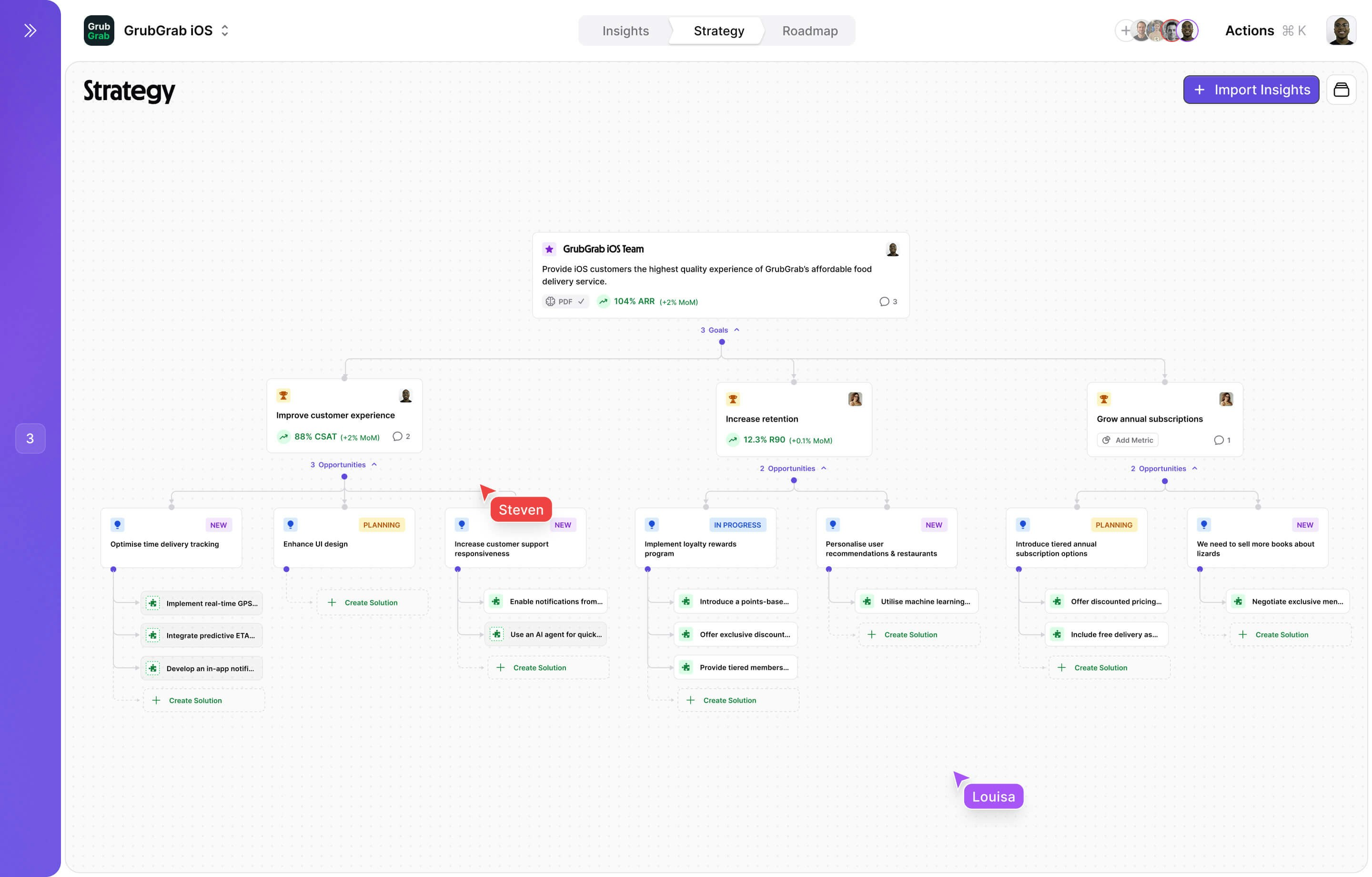
Squad Strategy brings your product strategy to life through interactive Opportunity-Solution Trees (OSTs). See how every feature connects to user needs and business goals, ensuring your team builds what matters most.
The Strategy Map automatically updates as you (or Squad) add opportunities, solutions, and tasks, giving you a real-time view of your product direction.
## Understanding the OST framework
Squad uses a hierarchical structure that ensures every piece of work traces back to your mission:
```mermaid theme={null}
graph TD
A[Mission] --> B[Goal 1]
A --> C[Goal 2]
B --> D[Opportunity 1.1]
B --> E[Opportunity 1.2]
C --> F[Opportunity 2.1]
D --> G[Solution 1.1.1]
D --> H[Solution 1.1.2]
E --> I[Solution 1.2.1]
style A fill:#e8f5e9
style B fill:#e3f2fd
style C fill:#e3f2fd
style D fill:#fff3e0
style E fill:#fff3e0
style F fill:#fff3e0
style G fill:#f3e5f5
style H fill:#f3e5f5
style I fill:#f3e5f5
```
Your north star purpose
Measurable outcomes
User needs to address
How you'll solve them
## Strategy Map interface
### Action buttons
The Strategy page includes action buttons in the top-right corner:
* **"+ Knowledge"** — Add business context, documents, or data to inform your strategy
* **"+ Discover Insights"** (purple) — Run AI-powered discovery to surface new insights from your connected data
* **Export icon** — Export or print your strategy map
### Visual hierarchy
The Strategy Map displays your entire product strategy in an intuitive tree structure:
```
🎯 Reduce delivery time by 13 minutes
├── 💡 Restaurant preparation delays
│ ├── 🔧 Prep time prediction system
│ └── 🔧 Kitchen capacity alerts
├── 💡 Inefficient driver routing
│ ├── 🔧 ML-based route optimization
│ ├── 🔧 Dynamic driver assignment
│ └── 🔧 Multi-order batching
└── 💡 Poor address accuracy
├── 🔧 GPS coordinate validation
└── 🔧 Delivery instructions feature
```
### Interactive features
* **Drag and drop:** Reorganize opportunities and solutions by dragging between goals
* **Expand/collapse:** Focus on specific branches of your strategy tree
* **Filter and search:** Find specific items using the command menu
* **Canvas actions:** Create, edit, or view items directly from the map
## Creating your strategy
Every strategy begins with clear, measurable goals:
```text GrubGrab Goal Examples theme={null}
✅ GOOD: "Increase order frequency from 2.1 to 3.5 orders/week by Q3"
- Specific metric (order frequency)
- Clear baseline (2.1) and target (3.5)
- Time-bound (by Q3)
✅ GOOD: "Reduce average delivery cost from $4.20 to $3.50 per order"
- Impacts unit economics
- Measurable reduction
- Supports "more affordable" mission
❌ BAD: "Improve customer experience"
- No specific metric
- Can't measure progress
- Too broad to action
```
Opportunities represent unmet user needs that, if addressed, will help achieve your goals:
**Good opportunities are:**
* **Problem-focused**, not solution-focused
* **Backed by evidence** from user research or data
* **Sizeable** in terms of affected users
* **Connected** to at least one goal
**Sources for opportunities:**
* User interviews and feedback
* Support ticket analysis
* Behavioral analytics
* Competitive analysis
* Market research
**Example transformation:**
* Weak: "Add a search feature"
* Strong: "Users can't find their favorite restaurants quickly"
For each opportunity, generate multiple solutions:
Let Squad AI suggest solutions:
Opportunity: "Users can't find vegetarian restaurants"
Squad AI suggests:
1. 🏷️ Dietary Filter System
* Add vegetarian/vegan/gluten-free filters
* Badge restaurants with dietary options
* Impact: High | Effort: Medium
2. 🔍 Smart Search Enhancement
* Natural language search ("vegan pizza near me")
* Auto-suggest dietary options
* Impact: High | Effort: High
3. 📱 Dedicated Dietary Section
* Separate browsing section for dietary needs
* Curated collections by preference
* Impact: Medium | Effort: Low
Evaluate solutions systematically:
| Criteria | Weight | Filter System | Smart Search | Dedicated Section |
| --------------- | ------ | ------------- | ------------ | ----------------- |
| User Impact | 40% | 9/10 | 8/10 | 6/10 |
| Dev Effort | 30% | 6/10 | 3/10 | 8/10 |
| Strategic Fit | 20% | 8/10 | 7/10 | 7/10 |
| Risk Level | 10% | 9/10 | 6/10 | 9/10 |
| **Total Score** | | **7.7** | **6.3** | **7.1** |
## Collaboration features
### Team alignment
Keep everyone on the same page:
Assign clear owners to each level of the tree
Discuss strategies directly on the map
Get alerts when strategies change
### Export and sharing
Share your strategy with stakeholders:
* **Interactive web view** - Read-only link for stakeholders
* **PDF export** - Static document for presentations
* **Miro/Mural** - Import to whiteboarding tools
* **JIRA sync** - Create epics from strategies
### Stakeholder views
Create custom views for different audiences:
* High-level goals and progress
* Impact on key business metrics
* Resource allocation across initiatives
* Quarterly roadmap alignment
* Detailed opportunity exploration
* Solution options and trade-offs
* User research connections
* Feature specifications
* Technical dependencies
* Implementation complexity
* Architecture decisions
* Sprint planning integration
## Best practices
Always begin with opportunities (problems) before jumping to solutions
Generate 3+ solution options for each opportunity
Review and update your strategy map weekly
Link opportunities to real user feedback and metrics
## Advanced features
### Strategy templates
Use pre-built templates for common scenarios:
```yaml Growth Strategy Template theme={null}
mission: "Accelerate sustainable growth"
goals:
- "Increase MAU by 50%"
- "Improve activation rate to 60%"
- "Boost retention to 40%"
opportunities:
- "New users don't experience value quickly"
- "Power users plateau in engagement"
- "Referral loop is broken"
```
```yaml Platform Strategy Template theme={null}
mission: "Become the essential platform"
goals:
- "Launch 3 new integration partners"
- "Increase API usage by 200%"
- "Developer NPS > 50"
opportunities:
- "Developers need better documentation"
- "API lacks key functionality"
- "Onboarding is too complex"
```
## Other features
Turn strategies into time-based delivery plans
Get AI help crafting and refining strategies
Validate strategies with data and feedback
## Overview
Squad Strategy brings your product strategy to life through interactive Opportunity-Solution Trees (OSTs). See how every feature connects to user needs and business goals, ensuring your team builds what matters most.
The Strategy Map automatically updates as you (or Squad) add opportunities, solutions, and tasks, giving you a real-time view of your product direction.
## Understanding the OST framework
Squad uses a hierarchical structure that ensures every piece of work traces back to your mission:
```mermaid theme={null}
graph TD
A[Mission] --> B[Goal 1]
A --> C[Goal 2]
B --> D[Opportunity 1.1]
B --> E[Opportunity 1.2]
C --> F[Opportunity 2.1]
D --> G[Solution 1.1.1]
D --> H[Solution 1.1.2]
E --> I[Solution 1.2.1]
style A fill:#e8f5e9
style B fill:#e3f2fd
style C fill:#e3f2fd
style D fill:#fff3e0
style E fill:#fff3e0
style F fill:#fff3e0
style G fill:#f3e5f5
style H fill:#f3e5f5
style I fill:#f3e5f5
```
Your north star purpose
Measurable outcomes
User needs to address
How you'll solve them
## Strategy Map interface
### Action buttons
The Strategy page includes action buttons in the top-right corner:
* **"+ Knowledge"** — Add business context, documents, or data to inform your strategy
* **"+ Discover Insights"** (purple) — Run AI-powered discovery to surface new insights from your connected data
* **Export icon** — Export or print your strategy map
### Visual hierarchy
The Strategy Map displays your entire product strategy in an intuitive tree structure:
```
🎯 Reduce delivery time by 13 minutes
├── 💡 Restaurant preparation delays
│ ├── 🔧 Prep time prediction system
│ └── 🔧 Kitchen capacity alerts
├── 💡 Inefficient driver routing
│ ├── 🔧 ML-based route optimization
│ ├── 🔧 Dynamic driver assignment
│ └── 🔧 Multi-order batching
└── 💡 Poor address accuracy
├── 🔧 GPS coordinate validation
└── 🔧 Delivery instructions feature
```
### Interactive features
* **Drag and drop:** Reorganize opportunities and solutions by dragging between goals
* **Expand/collapse:** Focus on specific branches of your strategy tree
* **Filter and search:** Find specific items using the command menu
* **Canvas actions:** Create, edit, or view items directly from the map
## Creating your strategy
Every strategy begins with clear, measurable goals:
```text GrubGrab Goal Examples theme={null}
✅ GOOD: "Increase order frequency from 2.1 to 3.5 orders/week by Q3"
- Specific metric (order frequency)
- Clear baseline (2.1) and target (3.5)
- Time-bound (by Q3)
✅ GOOD: "Reduce average delivery cost from $4.20 to $3.50 per order"
- Impacts unit economics
- Measurable reduction
- Supports "more affordable" mission
❌ BAD: "Improve customer experience"
- No specific metric
- Can't measure progress
- Too broad to action
```
Opportunities represent unmet user needs that, if addressed, will help achieve your goals:
**Good opportunities are:**
* **Problem-focused**, not solution-focused
* **Backed by evidence** from user research or data
* **Sizeable** in terms of affected users
* **Connected** to at least one goal
**Sources for opportunities:**
* User interviews and feedback
* Support ticket analysis
* Behavioral analytics
* Competitive analysis
* Market research
**Example transformation:**
* Weak: "Add a search feature"
* Strong: "Users can't find their favorite restaurants quickly"
For each opportunity, generate multiple solutions:
Let Squad AI suggest solutions:
Opportunity: "Users can't find vegetarian restaurants"
Squad AI suggests:
1. 🏷️ Dietary Filter System
* Add vegetarian/vegan/gluten-free filters
* Badge restaurants with dietary options
* Impact: High | Effort: Medium
2. 🔍 Smart Search Enhancement
* Natural language search ("vegan pizza near me")
* Auto-suggest dietary options
* Impact: High | Effort: High
3. 📱 Dedicated Dietary Section
* Separate browsing section for dietary needs
* Curated collections by preference
* Impact: Medium | Effort: Low
Evaluate solutions systematically:
| Criteria | Weight | Filter System | Smart Search | Dedicated Section |
| --------------- | ------ | ------------- | ------------ | ----------------- |
| User Impact | 40% | 9/10 | 8/10 | 6/10 |
| Dev Effort | 30% | 6/10 | 3/10 | 8/10 |
| Strategic Fit | 20% | 8/10 | 7/10 | 7/10 |
| Risk Level | 10% | 9/10 | 6/10 | 9/10 |
| **Total Score** | | **7.7** | **6.3** | **7.1** |
## Collaboration features
### Team alignment
Keep everyone on the same page:
Assign clear owners to each level of the tree
Discuss strategies directly on the map
Get alerts when strategies change
### Export and sharing
Share your strategy with stakeholders:
* **Interactive web view** - Read-only link for stakeholders
* **PDF export** - Static document for presentations
* **Miro/Mural** - Import to whiteboarding tools
* **JIRA sync** - Create epics from strategies
### Stakeholder views
Create custom views for different audiences:
* High-level goals and progress
* Impact on key business metrics
* Resource allocation across initiatives
* Quarterly roadmap alignment
* Detailed opportunity exploration
* Solution options and trade-offs
* User research connections
* Feature specifications
* Technical dependencies
* Implementation complexity
* Architecture decisions
* Sprint planning integration
## Best practices
Always begin with opportunities (problems) before jumping to solutions
Generate 3+ solution options for each opportunity
Review and update your strategy map weekly
Link opportunities to real user feedback and metrics
## Advanced features
### Strategy templates
Use pre-built templates for common scenarios:
```yaml Growth Strategy Template theme={null}
mission: "Accelerate sustainable growth"
goals:
- "Increase MAU by 50%"
- "Improve activation rate to 60%"
- "Boost retention to 40%"
opportunities:
- "New users don't experience value quickly"
- "Power users plateau in engagement"
- "Referral loop is broken"
```
```yaml Platform Strategy Template theme={null}
mission: "Become the essential platform"
goals:
- "Launch 3 new integration partners"
- "Increase API usage by 200%"
- "Developer NPS > 50"
opportunities:
- "Developers need better documentation"
- "API lacks key functionality"
- "Onboarding is too complex"
```
## Other features
Turn strategies into time-based delivery plans
Get AI help crafting and refining strategies
Validate strategies with data and feedback