> ## Documentation Index
> Fetch the complete documentation index at: https://docs.meetsquad.ai/llms.txt
> Use this file to discover all available pages before exploring further.
# Trustpilot
> Turn customer reviews into actionable business insights
**Category**: Insight Sources
## Overview
The Trustpilot integration automatically analyzes your Trustpilot reviews to surface common issues, praise, and customer sentiment. Squad's AI identifies patterns across your reviews, helping you understand what customers love and where you can improve.
## Benefits
**Discover hidden patterns:** Squad's AI clusters similar feedback across reviews, revealing issues that individual reviews might not make obvious.
**Focus on what's actionable:** Squad categorizes reviews into Feature Requests, Bug Reports, Praise, and General Feedback, then surfaces actionable opportunities that align with your goals.
**Prioritize by impact:** See which issues affect the most customers and correlate review themes with your overall ratings.
## Setup guide
1. Go to **Workspace dropdown → Integrations** in Squad
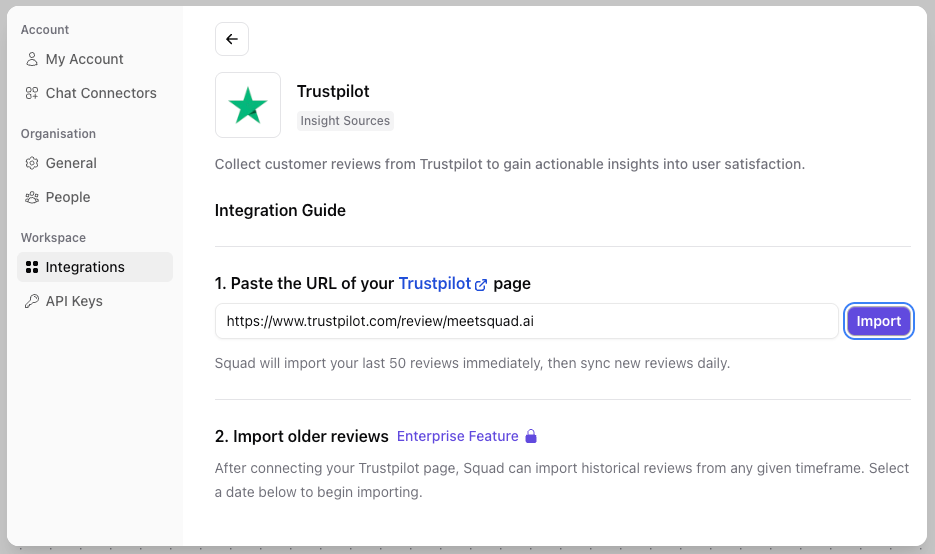 2. Find Trustpilot and click **Connect**
3. Paste the URL of your Trustpilot page (e.g., `https://www.trustpilot.com/review/yourcompany.com`)
Click `Import` and Squad will import your last 50 reviews immediately, then sync new reviews daily.
That's it! Monitor the [Insights](/features/insights) page for new insights and opportunities related to your reviews.
After connecting your Trustpilot page, Squad will import your last 50 reviews. Each day, up to 50 new reviews will be synced. For higher volumes and deeper historical analysis, [contact sales](https://meetsquad.ai/contact-sales).
## What Squad syncs
* **User reviews**: All reviews with text content
* **Review titles**: Customer-provided titles
* **Ratings**: Star ratings (1-5)
* **Date**: When the review was posted
* **Verified badge**: Whether the review is from a verified purchase
* **Language**: The language of the review
Squad syncs up to 50 new reviews every 24 hours. Upgrade your plan to access higher volumes and historical imports.
## Review analysis
Squad automatically performs:
### Topic detection
Groups similar feedback like:
* "Delivery took forever"
* "Shipping was slow"
* "Package arrived late" → Tagged as: **Delivery Speed**
### Type analysis
* **Praise**: What customers love about your product or service
* **Issues**: Pain points and frustrations
* **Feature requests**: What customers wish you offered
### Verified reviews
Trustpilot marks reviews as verified when they're tied to a confirmed transaction. Squad highlights this in analysis, helping you distinguish between verified customer experiences and general feedback.
## Common use cases
1. **Trust building**: Identify what drives positive reviews to encourage more of them
2. **Issue detection**: Catch recurring problems before they escalate
3. **Competitive insights**: Customers often compare your service to competitors in reviews
## Review insights dashboard
In Squad, navigate to [**Insights**](/features/insights) and filter by **Trustpilot** to see:
* Top positive and negative topics
* Actionable opportunities
* Emerging issues (new themes this week)
* Trends over time
## Troubleshooting
**No reviews appearing**
* Verify the URL is your Trustpilot business page (e.g., `trustpilot.com/review/...`)
* Check if your Trustpilot page has recent reviews with text content
* Reviews without text (rating only) are not imported
**Invalid URL error**
* Ensure you're using your Trustpilot review page URL, not your website URL
* The URL should be in the format: `https://www.trustpilot.com/review/yourcompany.com`
**Missing historical data**
* Free and standard plans import the last 50 reviews
* Enterprise plans can import historical reviews from any date
**Best practice**: Combine Trustpilot reviews with other feedback sources like support tickets and in-app feedback. Squad will automatically find correlations across all sources for a complete picture of customer sentiment.
2. Find Trustpilot and click **Connect**
3. Paste the URL of your Trustpilot page (e.g., `https://www.trustpilot.com/review/yourcompany.com`)
Click `Import` and Squad will import your last 50 reviews immediately, then sync new reviews daily.
That's it! Monitor the [Insights](/features/insights) page for new insights and opportunities related to your reviews.
After connecting your Trustpilot page, Squad will import your last 50 reviews. Each day, up to 50 new reviews will be synced. For higher volumes and deeper historical analysis, [contact sales](https://meetsquad.ai/contact-sales).
## What Squad syncs
* **User reviews**: All reviews with text content
* **Review titles**: Customer-provided titles
* **Ratings**: Star ratings (1-5)
* **Date**: When the review was posted
* **Verified badge**: Whether the review is from a verified purchase
* **Language**: The language of the review
Squad syncs up to 50 new reviews every 24 hours. Upgrade your plan to access higher volumes and historical imports.
## Review analysis
Squad automatically performs:
### Topic detection
Groups similar feedback like:
* "Delivery took forever"
* "Shipping was slow"
* "Package arrived late" → Tagged as: **Delivery Speed**
### Type analysis
* **Praise**: What customers love about your product or service
* **Issues**: Pain points and frustrations
* **Feature requests**: What customers wish you offered
### Verified reviews
Trustpilot marks reviews as verified when they're tied to a confirmed transaction. Squad highlights this in analysis, helping you distinguish between verified customer experiences and general feedback.
## Common use cases
1. **Trust building**: Identify what drives positive reviews to encourage more of them
2. **Issue detection**: Catch recurring problems before they escalate
3. **Competitive insights**: Customers often compare your service to competitors in reviews
## Review insights dashboard
In Squad, navigate to [**Insights**](/features/insights) and filter by **Trustpilot** to see:
* Top positive and negative topics
* Actionable opportunities
* Emerging issues (new themes this week)
* Trends over time
## Troubleshooting
**No reviews appearing**
* Verify the URL is your Trustpilot business page (e.g., `trustpilot.com/review/...`)
* Check if your Trustpilot page has recent reviews with text content
* Reviews without text (rating only) are not imported
**Invalid URL error**
* Ensure you're using your Trustpilot review page URL, not your website URL
* The URL should be in the format: `https://www.trustpilot.com/review/yourcompany.com`
**Missing historical data**
* Free and standard plans import the last 50 reviews
* Enterprise plans can import historical reviews from any date
**Best practice**: Combine Trustpilot reviews with other feedback sources like support tickets and in-app feedback. Squad will automatically find correlations across all sources for a complete picture of customer sentiment.